Specifications
Place of Origin :
China
Brand Name :
YZY
Price :
$16-18.5/pieces
Model Number :
YQ84-4
Certification :
CE/ROHS
MOQ :
100
Payment Terms :
T/T
Supply Ability :
50K/Month
Delivery Time :
30-45days
Packaging Details :
100*65*50mm/126g
Type :
Raspberry pi lcd display
Display Size :
4 inch LCD display
Supplier Type :
Factory
size :
4inch display
Outline Dimension :
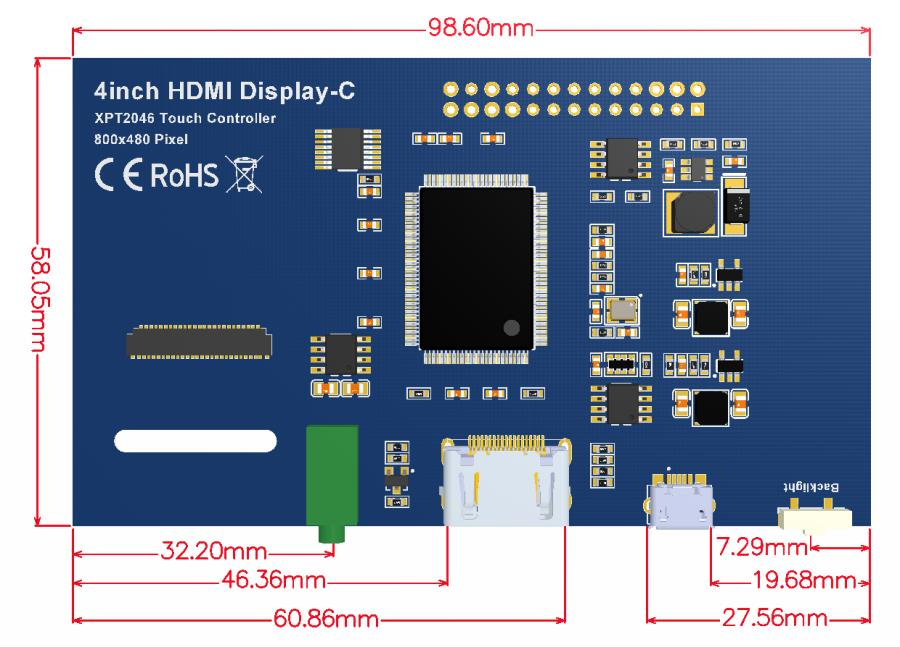
98.60*58.05
WEIGHT(LCM) :
126g
Video Input :
HDMI
Description

4Inch Raspberry Pi Zero Touch Screen LCD Display 800*480 HDMI Port RTP Touch Panel
【Product Description】
4’’ standard display, 800 × 480 resolution
IPS, fast response, wide viewing Angle, color restore true
With resistive touch screen, support touch control
Support backlight control,Brightness variation
Support standard HDMI interface input, compatible with and can be directly inserted with Raspberry Pi (3rd, 2nd, and 1st generation)
Can be used as general-purpose-use HDMI monitor, for example: connect with a computer HDMI as the sub-display (resolution need to
be able to force output for 800 x480)
No IO resources needed for display only (Raspberry Pi uses IO resources for touch)
CE, RoHS certification
【Product Parameters】
Size: 4.0 (inch)
SKU: MPI4008
Display Mode: IPS
Resolution: 800× 480 (dots)
Touch: 4-wire resistive touch
Dimensions: 143*134*51 (mm)
Weight: 127 (g)
【Hardware Description】
4 Inch Raspberry Pi Zero Touch Screen LCD Display 800*480 HDMI Port RTP Touch Panel
Hardware capabilities
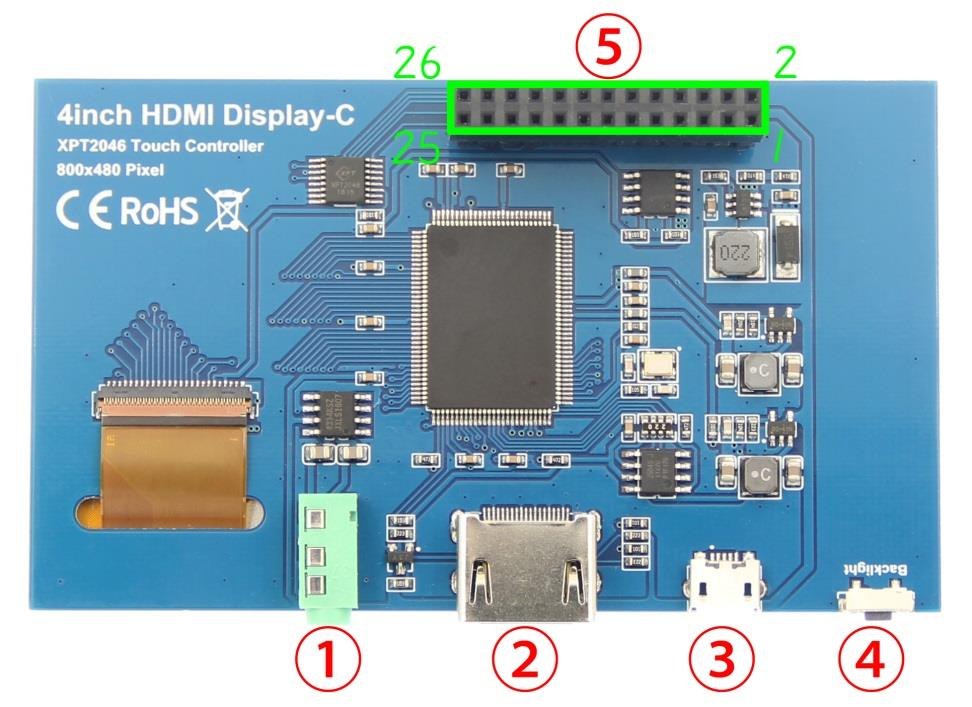
3.5mm Headphone Jack: Output audio signal
HDMI:Used to connect the main board and LCD display for HDMI transmission3 / 6
Micro USB:Get 5V Power from USB, If -13*2 Pin Socket has been connected, that this USB interface can be No Connect.
Backlight adjustment button: Short press backlight change 10%, long press a few seconds to close backlight; short press to
open backlight
13*2 Pin Socket:Get +5V Power from raspberry Pi to LCD, at the same time transfer touch signal back to Raspberry Pi.
13*2 Pin Socket interface definition

Pin
Name
Description
1,17
2,4
3,5,7,8,10,
11,12,13,15,
16,18,24
3.3V
5V
NC
Power supply +3.3V
Power supply +5V
NC
6,9,14,20,25
GND
GND
19
21
22

TP_SI

TP_SO

TP_IRQ

SPI data input of touch pane

SPI data output of touch panel

The touch panel is interrupted and the low level is
detected when the touch panel is pressed down
23
TP_SCK Touch the SPI clock signal of the panel
26
TP_CS
Touch panel select signal, low level select touch panel

【Dimensions】
4 Inch Raspberry Pi Zero Touch Screen LCD Display 800*480 HDMI Port RTP Touch Panel

【Connect with Raspberry Pi
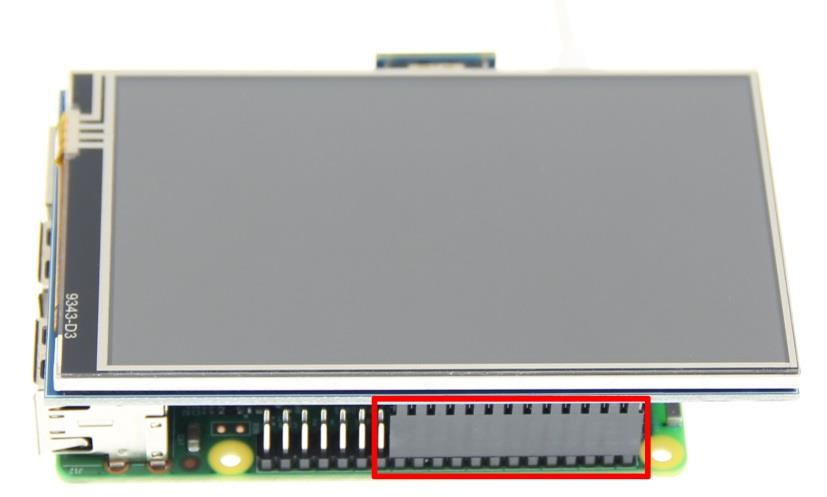
1) Connect The LCD 13*2 Pin socket to Raspberry Pi as the Picture show
4 Inch Raspberry Pi Zero Touch Screen LCD Display 800*480 HDMI Port RTP Touch Panel
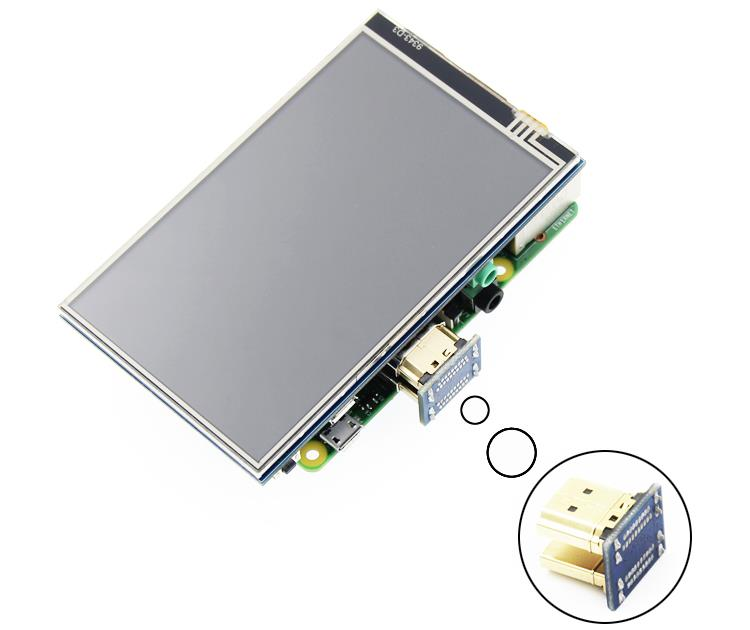
2) Connect The LCD and Raspberry Pi with the HDMI adapter
4 Inch Raspberry Pi Zero Touch Screen LCD Display 800*480 HDMI Port RTP Touch Panel
【How to use with Raspbian】
Step 1, Install Raspbian official image
1) Download from the official website:
https://www.raspberrypi.org/downloads/
2) Format Micro SD card by SDFormatter
3) Burn the official image into Micro SD card by using Win32DiskImager.
Step 2,Install Driver
Method 1: online installation (Raspberry Pi need to connect to the Internet)
1) Log onto the Raspberry Pi by Putty SSH (User: pi; Password: raspberry)
2) Execute the following command (you can click the right mouse button to paste after copied in Putty)
git clone https://github.com/goodtft/LCD-show.git
chmod -R 755 LCD-show
cd LCD-show/
sudo ./MPI4008-show
3) Wait for a moment after executing, you can use the LCD.
Method 2: offline installation
1) Download from the web site or copy the "lcd-show.tar.gz" drive from the CD-ROM to the root
directory of the Raspberry Pi system card;
http://www.lcdwiki.com/res/RaspDriver/LCD-show.tar.gz
(Suggestion: copy flash driver directly to Micro SD card after completion of Step 1)
2) Unzip and extract drive files as the following command:
cd /boot
sudo tar zxvf LCD-show.tar.gz
cd LCD-show/
sudo ./MPI4008-show
3) Wait for a moment after executing, you can use the LCD.
【How to use with Ubuntu,Kali and RetroPie】
Step 1, Install Ubuntu, Kali or RetroPie official image
1) Download from the official website:
Ubuntu: https://ubuntu-mate.org/raspberry-pi/
Kali: https://www.offensive-security.com/kali-linux-arm-images/
RetroPie: https://retropie.org.uk/download/
2) Format Micro SD card by SDFormatter
3) Burn the official image into Micro SD card by using Win32DiskImager.
Step 2,Install Driver
Due to system differences, Ubuntu, Kali, RetroPie are temporarily unable to install drivers online.
Only the offline installation method can be used.
1) Download the corresponding version of driver "LCD-show.tar.gz" from the website to the root
directory of Micro SD card of raspberry PI system
(Note: if the version does not match, the LCD may not display properly):
http://www.lcdwiki.com/4inch_HDMI_Display-C#Download_Resources
(After the completion of the recommended step 1, copy the driver directly into the Micro SD card root directory)
2) Unzip and install the driver using the following command:
cd /boot
sudo tar zxvf LCD-show.tar.gz
cd LCD-show/
sudo ./MPI4008-show
3) After the command is executed, the system will restart and the LCD will work normally
【How to use Raspberry Pi quickly】
If you find it difficult to install the driver in the previous step, or if the display is abnormal, please
use our pre-installed driver image
1) Download and install the driver image file from the website:
http://www.lcdwiki.com/4inch_HDMI_Display-C#Download_Resources
2) Format Micro SD card by SDFormatter
3) Burn the official image into Micro SD card by using Win32DiskImager.
4) Insert Micro SD card, connect LCD, start Raspberry Pi, and it will work normally
【How to use as PC monitor】
Connected the computer HDMI output to the LCD HDMI interface by HDMI cable.
Power to Micro USB interface
If you have multiple monitors, please pull the other displayer, and make this LCD as the only
displayer for testing.
As computer monitors, the touch function will not be available.


Send your message to this supplier
Send Now

4 Inch Raspberry Pi Zero Touch Screen LCD Display 800*480 HDMI Port RTP Touch Panel

Ask Latest Price
Place of Origin :
China
Brand Name :
YZY
Price :
$16-18.5/pieces
Model Number :
YQ84-4
Certification :
CE/ROHS
MOQ :
100
Contact Supplier
4 Inch Raspberry Pi Zero Touch Screen LCD Display 800*480 HDMI Port RTP Touch Panel

Shenzhen YZY Technology Co., Ltd

Verified Supplier
1 Years
shenzhen
Since 2008
Business Type :
Manufacturer, Exporter, Seller, Agent, Trading Company
Total Annual :
6000000-8000000
Employee Number :
200~230
Certification Level :
Verified Supplier
Contact Supplier
Submit Requirement