features are as follows:
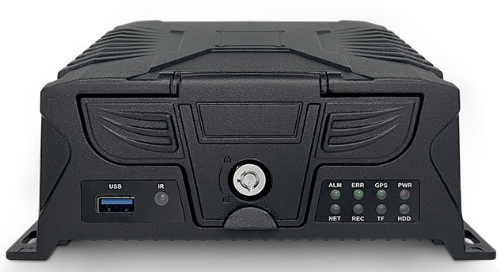
Front panel appearance diagram

| Serial | Name | Silk Print | Detailed description |
| | Remote receiver | IR | Infrared receiver, used to receive remote control signal |
| ② | Indicator LED | PWR | Power Indicator LED. LED ON when the power supply is normal |
| GPS | GPS status indicator. The light is always on when the GPS is working normally, and it flashes when there is no signal | ||
| ODM | Indicate heating or other functions | ||
| ALM | Alarm Indicator LED. LED ON when the alarm is generated | ||
| HDD | HDD Indicator LED. LED is always on when HDD is recognized, flashes when writing | ||
| TF | TF card Indicator LED. LED is always on when TF card is recognized, flashes when writing | ||
| REC | Video indicator LED. Flashes when recording | ||
| NET | Network status indicator. The light will always be on when the network connection is successful, and flash when the network is not connected | ||
| ③ | Electronic locks | LOCK | When the electronic lock is locked, MDVR automatically turns on; when the electronic lock is opened, MDVR automatically turns off |
| ④ | USB port | USB | Use to backup files and upgrade firmware version |
| ⑤ | HDD box TF card port SIM card port | Open the interface baffle through electronic lock, insert HDD/SSD, TF card and SIM card. When the electronic lock is locked, please do not open the interface baffle forcefully, it will damage the machine |

| Serial | Name | Silk Print | Description |
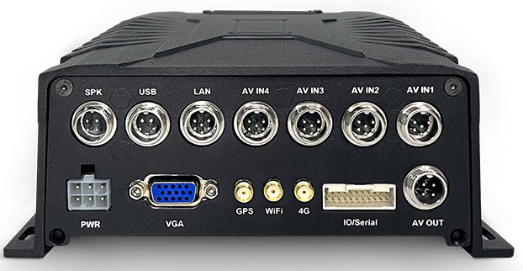
| ① | AV input Port | AV IN1 | 1CH~2CH audio and video input interface |
| AV IN2 | 3CH~4CH audio and video input interface | ||
| AV IN3 | 5CH~6CH audio and video input interface | ||
| AV IN4 | 7CH~8CH audio and video input interface | ||
| ② | LAN | LAN | Wired network port, can connect to wired network or IP camera |
| ③ | Fireproof box | USB | External fireproof box, disaster recovery video |
| ④ | Speaker | SPK | Connect the intercom handle or speaker |
| ⑤ | CVBS output Port | AV OUT | CVBS audio and video output interface |
| ⑥ | IO/Serial Port | IO/Serial | 8xI/O input, 2xI/O Output, 2xRS232, 1xRS485, 1xPulse speed |
| ⑦ | 4G Antenna Port | 4G | External special 4G antenna. It should be placed where without shielding and interference |
| ⑧ | WiFi Antenna Port | WiFi | External special WiFi antenna. It should be placed where without shielding and interference. Optional |
| ⑨ | GPS Antenna Port | GPS | External special GPS antenna. It should be placed where without shielding and interference |
| ⑩ | VGA output Port | VGA | VGA audio and video output interface |
| ⑪ | Power Port | DC8-36V | Power Input port |
Power interface definition
| Pin diagram | Pin definition | ||
![]() | 1 | 2 | 3 |
| PWR- | PWR+ | ||
| 4 | 5 | 6 | |
| PWR- | PWR+ | ACC | |
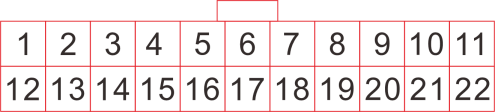
I/O interface diagram:

The detailed pin definition is as follows(RS485 is reserved and not standard):
| 1 | 2 | 3 | 4 | 5 | 6 | 7 | 8 | 9 | 10 | 11 |
| WHITE | WHITE | WHITE | WHITE | BLACK | RED | GREY | BROWN | BROWN | RED | YELLOW |
| ALM IN2 | ALM IN4 | ALM IN6 | ALM IN8 | GND | DC12V | RS485-B | RS232-2-RX | RS232-1-RX | DC5V | Pulse speed |
| 11 | 12 | 13 | 14 | 15 | 16 | 17 | 18 | 19 | 20 | 20 |
| WHITE | WHITE | WHITE | WHITE | GREEN | BLACK | GREY | PURPLE | PURPLE | BLACK | BLUE |
| ALM IN1 | ALM IN3 | ALM IN5 | ALM IN7 | ALM OUT1 | GND | RS485-A | RS232-2-TX | RS232-1-TX | GND | ALM OUT2 |