Specifications
Brand Name :
YZY
Model Number :
YCH050WVC-T
Certification :
CE/ROHS
Place of Origin :
Guangdong, China
MOQ :
300pcs
Price :
$37-40/pieces
Payment Terms :
T/T
Supply Ability :
5K/Month
Delivery Time :
10-30 work days
Display Size :
5 inch
Supplier Type :
Factory
Description
YCH050WVC-T 5 Inch IPS HDMI Portable Display with 800*480 Resolution
Product Description

YCH050WVC-T 5 Inch IPS HDMI LCD Display with 800*480 Resolution 5 Point Capacitive Touch Screen

IPS 5 Inch Portable Monitor 800×480 Resolution HDMI and Raspberry Pi Compatibility
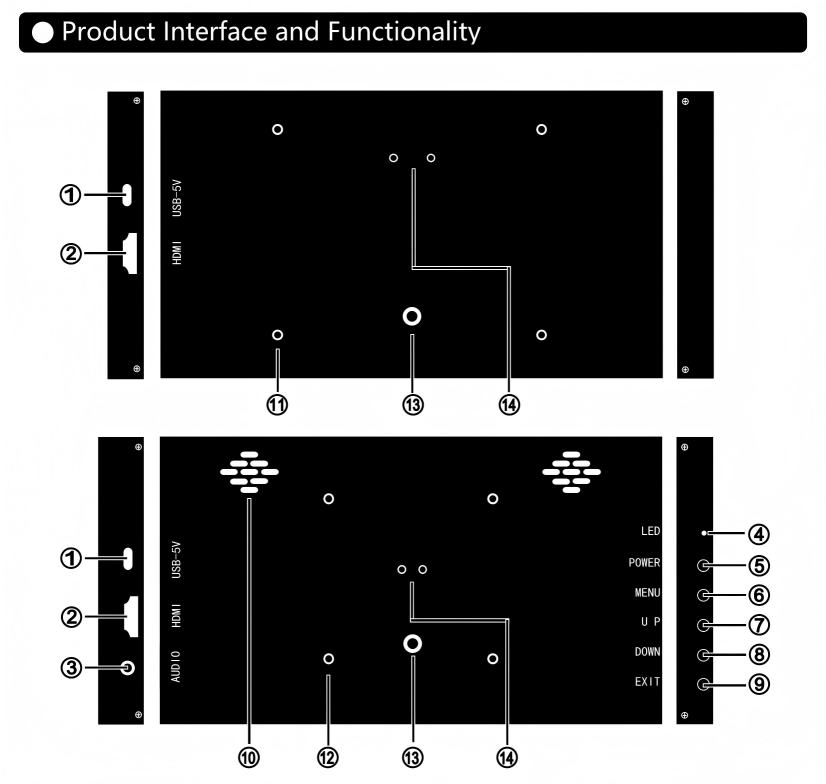
Interface and Keys:
USB-5V:Power and touch signal input interface(USB-C).
HDMI:Video and audio signal input interface(miniHDMI/HDMI).
AUDIO:Audio output interface.
LED:Power indicator,green:power-on state,red:power-off state.
POWER:Power button to power on/off the monitor.
MENU:Activate OSD menu or function adjustment confirmation.
UP:When the menu is opened,as the up or right function selection button,the value of the progress bar increases;when the menu is closed,it serves as a shortcut key for increasing volume.
DOWN:When the menu is opened,as the down or left function progress bar decreases;when the menu is closed,it serves as a shortcut key for reducing volume.
EXIT:When the menu is open,it is used as an exit menu button;when the menu is closed,press this key to enter the input signal shortcut switch selection.
1.5W×2 stereo speakers.
Mechanical structure:
M2.5/58x49mm bracket fixing hole(Mounting holes for the Raspberry Pi3B/4B motherboard).
M3/75x75mm bracket fixing hole(VESA standard spacing).
M6 fixing hole(for fixing the monitor or installing other brackets).
Adjustable Angle Bracket Mounting Hole(Optional accessories,scan the QR code below to purchase).
Connect to Windows/macOS Host
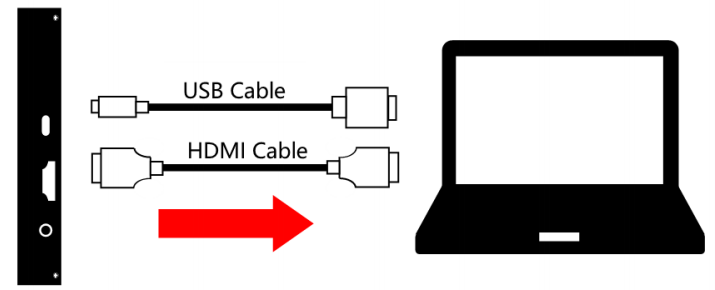
IPS 5 Inch Portable Monitor 800×480 Resolution HDMI and Raspberry Pi Compatibility Connect one end of the included HDMI cable to the computer and the other end to the monitor.After the connection is complete,some metal of the terminal cable will be exposed,which is normal.
※For monitors without touch function,the USB cable only provides power to the monitor.Simply connect the USB cable to the computer or power adapter
(current ≥0.5A).
※For monitors with touch function,the USB cable needs to be connected to the USB interface of the Windows system host with data transfer function.At this time,the USB cable transfers power and touch signals.
IPS 5 Inch Portable Monitor 800×480 Resolution HDMI and Raspberry Pi Compatibility ①When connecting the monitor to the host,please first connect the power supply and then connect the HDMI cable to ensure smooth signal transmission.
②Some macOS system versions may have touch compatibility issues.
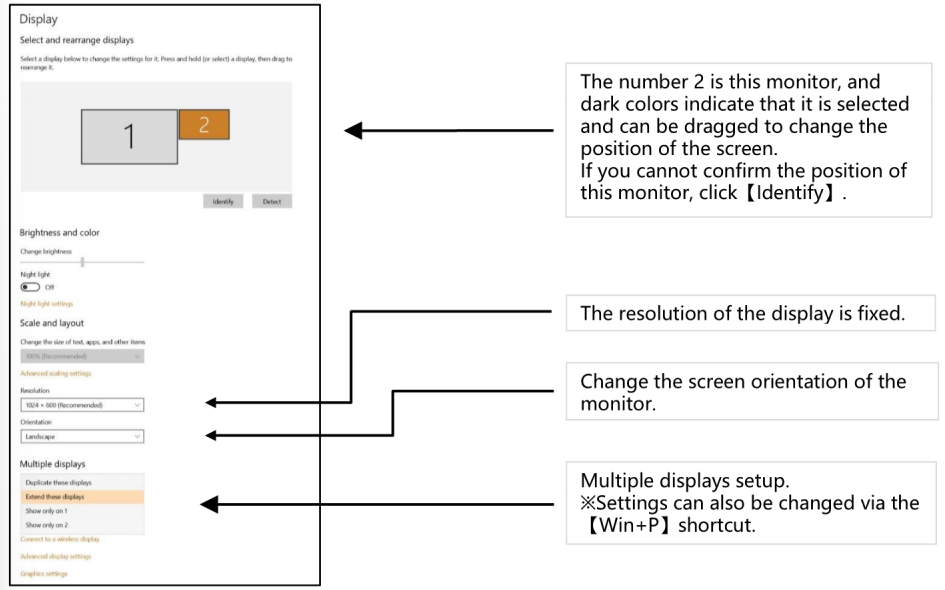
Windows System Display Settings

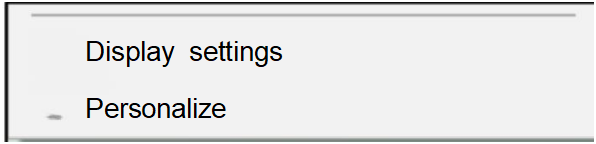
① Right-click an empty space on the computer desktop→select【Display settings】

IPS 5 Inch Portable Monitor 800×480 Resolution HDMI and Raspberry Pi Compatibility
② Open the Display settings and set it according to your preference.
IPS 5 Inch Portable Monitor 800×480 Resolution HDMI and Raspberry Pi Compatibility
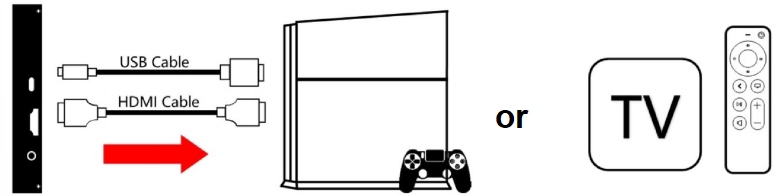
Connect to Game Console and TV Box
IPS 5 Inch Portable Monitor 800×480 Resolution HDMI and Raspberry Pi Compatibility
①Video game devices do not support touch functionality.
②When connecting the monitor to the host,please first connect the power supply and then connect the HDMI cable to ensure smooth signal transmission.
Connect to Raspberry Pi
① Download and install the official Raspberry Pi image.
1) Download the latest image from the official Raspberry Pi.
2) Follow the official tutorial steps to install the system to the memory card.
② Modify "config.txt".
Open the config.txt file in the root directory of the microSD card and add the following code at the end of the file:
max usb current=1
hdmi force hotplug=1
config hdmi boost=7
hdmi_group=2
hdmi mode=87
hdmi drive=2
hdmi cvt 1024600606000
※Note:For a resolution of 800×480 display,the last line needs to be adjusted to hdmi cvt 800480606000.
③Insert the microSD card into the Raspberry Pi motherboard,and connect the Raspberry Pi motherboard to the monitor via HDMl and USB(for the power supply of the Raspberry Pi, please use a 3A or above power supply).

Parameter
Model P50C-T Screen Size 5.0inch
Resolution 800×480 Power Supply DC 5V-1A(5W)
Viewing Angle 170°Full View Dimensions 123×79×16.3mm
NTSC Ratio 50%NTSC Response Time 25ms
Zoom 16:9 Contrast 800:1
Brightness 300cd/m2 Touch Function Capacitive 5-Point Touch
Speaker 1.5W*2 Stereo Speakers Shell Material Aluminum Alloy(Black or White)
Other Functions Support wall mounting(58×49mm)
Package Contents LCD Screen,HDMI Cable,USB Cable,User Guide


Troubleshooting and FAQs:


This page describes the problems and solutions that users may encounter,if the problem persists after trying these solutions,please contact us to solve.
■ Display Problems
The cable connection is normal,the screen cannot be displayed or the screen is black:
When connecting the screen,please plug in the USB cable to supply power to the monitor first,and then plug in the HDMI cable to access the signal.
◆ Please connect the HDMI cable directly to the host,do not use an interface converter in the middle,some converters do not support this resolution output.
◆ Please check whether the display driver has been installed(for Linux systems such as RPi,you need to modify the system settings or install the driver to make the display normal).
◆ Please confirm whether the HDMI interface of the host has signal output.
Display flashes,turns white,or turns off automatically after a period of time:
◆ There may be insufficient power supply to the monitor.When the monitor is powered by the Raspberry Pi, please increase the power supply of the Raspberry Pi to 3A or above.
◆ It shows that the signal input is unstable,please try another HDMI cable.
■ Touch Problems
Screen works fine,but touch doesn't work:
For most operating systems,the driver will be installed automatically after connecting to the monitor(driver- free).If there is no touch,please check the following points:
◆ Please check if the original cable is used.
◆ Please check whether the purchased product supports touch.
◆ Please connect the monitor,restart the computer and try again.
◆ Please make sure the USB cable is connected to the host.


Send your message to this supplier
Send Now

IPS 5 Inch Portable Monitor 800×480 Resolution HDMI and Raspberry Pi Compatibility

Ask Latest Price
Brand Name :
YZY
Model Number :
YCH050WVC-T
Certification :
CE/ROHS
Place of Origin :
Guangdong, China
MOQ :
300pcs
Price :
$37-40/pieces
Contact Supplier
IPS 5 Inch Portable Monitor 800×480 Resolution HDMI and Raspberry Pi Compatibility

Shenzhen YZY Technology Co., Ltd

Verified Supplier
1 Years
shenzhen
Since 2008
Business Type :
Manufacturer, Exporter, Seller, Agent, Trading Company
Total Annual :
6000000-8000000
Employee Number :
200~230
Certification Level :
Verified Supplier
Contact Supplier
Submit Requirement