Ultrasonic Portable Electronic Whiteboard With USB Cable / Wireless Dongle
Portable ultrasonic electronic whiteboard - A versatile interactive solution for presentations and collaborative work sessions.
Product Composition
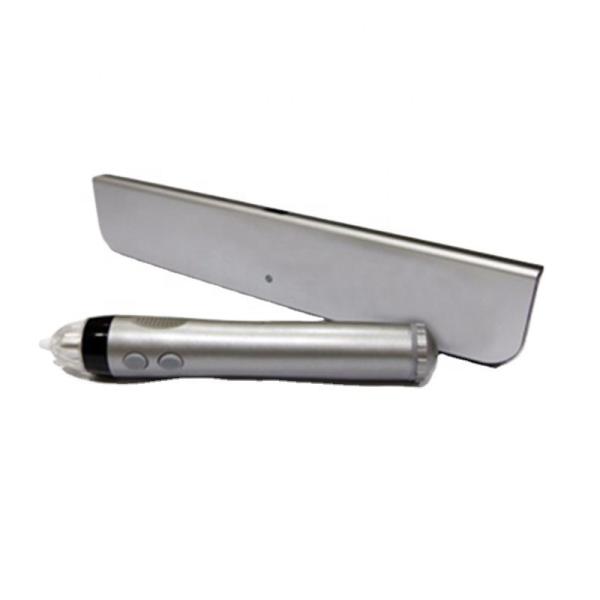
- Interactive Stylus
- Stylus tips
- Key 1: Left mouse button
- Key 2: Right mouse button
- EWB Sensor
- Wireless Dongle
- Power Adapter (optional)
EWB Sensor Features
EWB Sensor can be placed in any position around the writing board. Calibration operation is required after first use or change of installation position.
Internal batteries are charged by connecting a USB cable to a computer or to a power adapter.
Wireless Dongle
Connect computer USB interface to receive data sent by EWB Sensor.
Connectivity
USB cable or wireless dongle
Specifications
| Component |
Specifications |
| Interactive Stylus |
Battery: 1 AA 1.5V battery or 1 AA 1.2V rechargeable battery or 1 AA 3.6V rechargeable battery
Battery life: 30-60 hours
Dimensions: 152mm × 25mm
Weight: 50g
|
| EWB Sensor |
PC Systems: Windows, MAC, Linux, Android, Chrome OS
Work area: 3m × 1.5m
Power: USB or Internal battery
Battery life: 3 hour charge time for 5 hours
Dimensions: 227mm × 43mm × 11mm
Weight: 85g
Power Consumption: 0.5W
Tracking Technology: Ultrasound
Wireless Technology: BT
Wireless Power: < 10mw
Operating Temperature: 10°C - 35°C
|
| Wireless Dongle |
PC Systems: Windows, MAC, Linux, Android, Chrome OS
Wireless Power: < 10mw
|
| Power Adapter |
INPUT: AC100-240V, 50/60HZ, 0.5A
OUTPUT: DC 5V ≥500mA
|
Operation
Turn On: Long press power sign in upper left corner to turn on.
Turn Off: On-state, press the power sign in the upper left corner to turn off (automatically shuts down after 30 minutes of non-operation).
Calibration: Required when the position of EWB Sensor, the position and area of projector change for the first time.
Calibration Procedure:
- Turn EWB Sensor on and connect to the computer via USB or wireless
- Press the Stylus key 2 for more than 3 seconds in a 2 cm radius semicircle near the center of the EWB Sensor front end
- Hear a buzzer sound indicating entry into calibration mode
- Pointer on screen jumps to position of first calibration point
- Click on calibration point with tip of stylus
- If calibration point succeeds, hear a click and pointer jumps to next calibration point
- When all nine calibration points pass, three clicks indicate successful calibration
To exit calibration: Hold down key 1 of stylus for more than 2 seconds (hear two short sounds).
Calibration mode automatically exits after 30 seconds of non-operation (two short sounds).
Indicator Status Light
- Light off: Power off
- Red light: Wireless connected
- Red light flashing: Low battery
- Green light: Normal writing
- Green light flashing: Battery charging
- Orange light: Not connected to PC
Package Contents
- 1 Interactive Stylus
- 1 EWB Sensor
- 1 Wireless Dongle
- 1 USB Cable for Charge
- 1 Mounting plate
- 1 Adhesive strip
- 5 Stylus tips
Note: Package does not include Power Adapter. Charging can be done via computer USB interface.