Specifications
Panel transparency :
38%
Contrast ratio :
8ms
CPU :
14th Gen Intel I9-14900KF Proceesor
Standard colours :
1.07B 10Bit
OS :
Android or Windows optional
Resolution :
1080×1920
Onboard interface :
1 X RJ45, 2 X HDMI, 4 X USB2.0
refresh rate :
120Hz
Input Voltage :
AC 100~240V, 50hz-60hz
Touchscreen type :
Projected Capacitive Touch screen
Brand Name :
ZXTLCD
Model Number :
ZXTLCD-OD020
Certification :
CE/Rohs/FCC
Place of Origin :
Guangdong, China
MOQ :
1
Price :
negotiable
Payment Terms :
L/C,T/T
Supply Ability :
2000 pcs per month
Delivery Time :
3-5 working days
Packaging Details :
wooden case, carton, flight cases are optional
Type of backlight :
OLED self-luminous
RAM :
16GB
Discrete Graphics card :
12GB GIGABYTE 4070
Appearance Color :
White/Black/Customization
Built-in wifi :
150Mbps 802.11n wifi integate
Touch points :
10 points
Brightness :
400nits (center 1 point.typ.)
Audio system :
Built-in 10 W X 2 Speakers
Screen Size :
55 inch
SSD :
512GB
Viewing Angle :
Min 60/60/60/60
Protype :
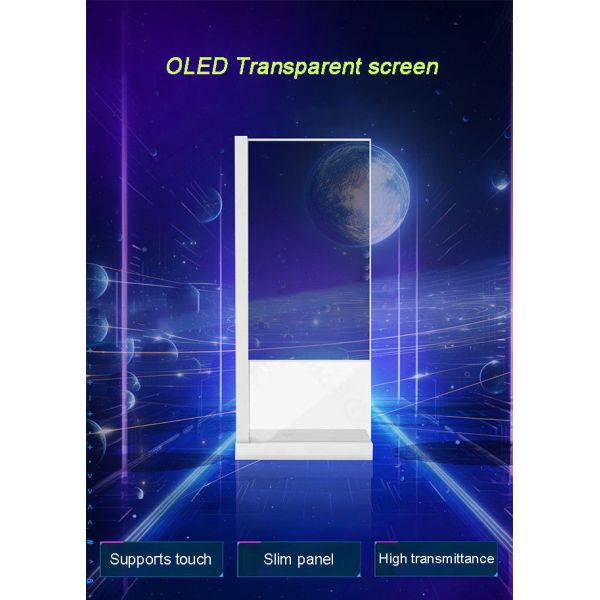
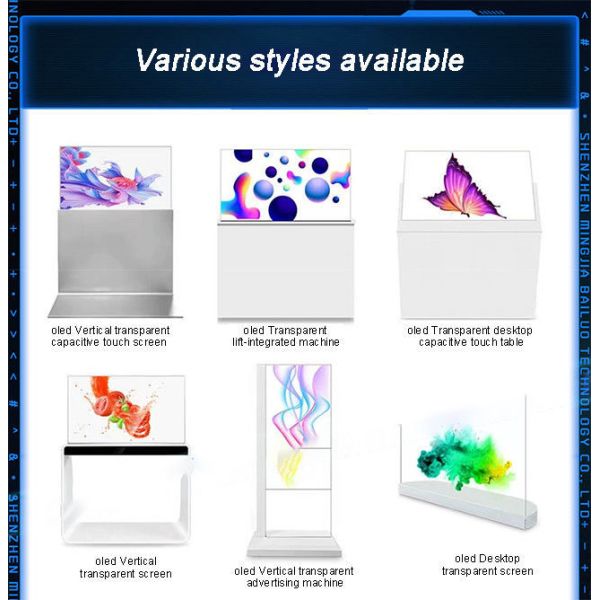
Desktop / Floor standing / Interactive(Optional)
Description

4K Resolution Transparent OLED Capacitive Touch See Through Screen


4K Capacitive Touch Transparent OLED Screen

The 4K Capacitive Touch Transparent OLED Screen combines detailed visual content, a see-through display surface, and direct touch interaction. Visitors can select information, explore product features, view diagrams, and navigate media while the physical object or environment behind the panel remains visible.

It is suitable for retail demonstrations, exhibition systems, museum interpretation, corporate showrooms, and custom interactive installations. Its value is not limited to image quality or transparency. The complete experience depends on whether the capacitive touch interface responds accurately, remains easy to understand, and works reliably after integration into the final structure.

Why Capacitive Touch Precision Matters

Public users expect a touchscreen to respond immediately. If a button requires repeated tapping, activates the wrong command, or reacts slowly, visitors may assume the entire system is faulty.

A precision review should evaluate:

  • Touch-point accuracy
  • Response speed
  • Edge-area performance
  • Gesture recognition
  • Button spacing
  • Accidental input
  • Interface feedback
  • Screen stability
  • Recovery after inactivity

Touch performance should be tested with the final mounting structure and software rather than judged only from an uninstalled sample.

Design the Interface Before Finalizing the Hardware

The intended user task affects screen height, orientation, reach distance, interface depth, and controller requirements. Define the interaction flow before approving the enclosure.

A practical public-use sequence may include:

  1. Display a clear invitation to interact
  2. Let the visitor select a product or topic
  3. Present one level of detailed information
  4. Offer a comparison, animation, or related feature
  5. Provide a clear next action
  6. Return automatically to the home screen

The main task should remain short enough for first-time visitors to complete without staff instruction.

Use 4K Content Selectively

A 4K Transparent OLED Screen can present detailed product images, diagrams, text, and visual explanations. However, higher visual detail should not lead to an overcrowded interface.

Use the available image detail for:

  • Product close-ups
  • Material textures
  • Technical diagrams
  • Internal structures
  • High-quality brand graphics
  • Side-by-side comparisons
  • Detailed museum content
  • Interactive visual labels

Keep the opening screen simple. Detailed information should appear after the visitor selects a topic.


4K Resolution Transparent OLED Capacitive Touch See Through Screen

Create Touch Targets for Real Users

Buttons that look attractive in a desktop mockup may be too small for public interaction. Controls should be designed according to finger size, viewing distance, and installation height.

For better usability:

  • Use large touch targets
  • Leave space between controls
  • Keep labels short
  • Avoid controls at difficult edges
  • Provide visible pressed states
  • Maintain consistent navigation
  • Include home and back controls
  • Prevent important buttons from moving
  • Avoid relying on hidden gestures

Every touch should produce immediate visual feedback so the user knows the system has received the command.

Coordinate Digital Content with the Background

Transparent OLED content must work with the object, fixture, or interior behind the screen. Busy backgrounds can reduce text readability and make controls difficult to identify.

The first interface mockup should show:

  • The real product or exhibit
  • Final background materials
  • Expected lighting
  • Display position
  • Touch controls
  • Transparent areas
  • Visitor viewing distance

Use open layouts, strong contrast, concise text, and controlled motion. Avoid covering the entire panel with opaque menus, as this removes much of the transparent visual effect.

Test Touch Accuracy Across the Screen

Do not test only the centre of the panel. Interactive controls may appear near corners, edges, or over different background areas.

The acceptance test should include:

Centre Controls

Confirm that primary menu buttons respond accurately and consistently.

Edge Controls

Test back, home, language, and navigation buttons positioned near the perimeter.

Repeated Input

Use the same controls repeatedly to identify missed touches or inconsistent behavior.

Fast Selections

Test whether quick user actions cause duplicate input, delayed response, or incorrect page changes.

Gesture Input

If the software supports swiping, dragging, zooming, or rotation, verify each gesture using the final application.

The exact supported touch behavior depends on the selected hardware and software configuration.

Plan for Different Interaction Conditions

A public display may be used by visitors of different heights, ages, and technical abilities. Some users will tap firmly, while others will touch lightly or move quickly.

Testing should include:

  • First-time users
  • Sales or exhibition staff
  • Different user heights
  • Left- and right-handed operation
  • Multiple interface languages
  • Long and short interaction sessions
  • Use after screen cleaning
  • Use under normal site lighting

Any special requirement, including operation with gloves or other input conditions, should be confirmed during product specification rather than assumed.

Mounting Stability Affects the Experience

A precise touch interface still feels unreliable if the display moves, flexes, or vibrates during use. The mounting system should provide stable support while protecting the transparent panel.

The installation review should cover:

  • Mounting height
  • Touch reach
  • Frame tolerance
  • Panel protection
  • Surface stability
  • Controller access
  • Power and signal routing
  • Ventilation
  • Cable concealment
  • Cleaning and service clearance

The final screen angle should also limit reflections without making controls uncomfortable to reach.


4K Resolution Transparent OLED Capacitive Touch See Through Screen

Commission the Complete System

Final approval should evaluate the display, touch layer, software, content, mounting, background, and lighting together.

Ask real visitors to complete the main task without guidance. Observe whether they recognize the screen as interactive, select the correct controls, understand the information, and return to the starting point.

Turn Precision into a Better Visitor Experience

The 4K Capacitive Touch Transparent OLED Screen is a strong option when a project requires detailed content and accurate interaction without completely hiding the physical scene behind the display.

When touch targets, visual hierarchy, background contrast, mounting stability, recovery behavior, and real-user testing are planned together, the system can provide a responsive and convincing interactive experience rather than simply adding touch functionality to a transparent panel.


If you would like to get the specification about above product, or you hope to discuss your requirements or need any additional information on our this product , then please do not hesitate to send us a inquiry and contact our sales team now.

Send your message to this supplier
Send Now

4K Resolution Transparent OLED Capacitive Touch See Through Screen

Ask Latest Price
Panel transparency :
38%
Contrast ratio :
8ms
CPU :
14th Gen Intel I9-14900KF Proceesor
Standard colours :
1.07B 10Bit
OS :
Android or Windows optional
Resolution :
1080×1920
Contact Supplier
4K Resolution Transparent OLED Capacitive Touch See Through Screen

Shenzhen ZXT LCD Technology Co.,Ltd

Verified Supplier
2 Years
shenzhen
Since 2017
Business Type :
Manufacturer
Total Annual :
25,000-50,000
Employee Number :
50~100
Certification Level :
Verified Supplier
Contact Supplier
Submit Requirement